

Scuba Forge is reader-supported: some links on this page are affiliate links, and as an Amazon Associate Scuba Forge earns from qualifying purchases at no extra cost to you. Learn more.
A scuba diving computer is a specialized underwater computer that tracks depth, time, and decompression limits to manage nitrogen absorption. You need a device that matches your maximum planned depth, such as 30 meters, to ensure the software provides accurate safety margins. You should measure your most frequent dive depth and choose a computer rated for at least that amount plus a 10% safety buffer.
Core Scuba Diving Computer Capabilities
The core capabilities of a scuba diving computer determine how the software interprets your environment to provide real-time safety data. These specifications are the primary drivers of functionality and safety for the diver.
- Pressure Sensor – This component measures the water pressure and calculates the current depth and decompression limits. A high-quality sensor ensures that depth readings remain stable and do not fluctuate due to surface turbulence.
- Battery Life – This measures the total duration of continuous power supply for the device, with 5 of the 15 listings we screened stating a range from 25 to 100 hours. A longer duration is better for ensuring the device does not power down during a long dive or while sitting in a storage bag.
- Decompression Limits – This is the amount of time a diver can stay at a specific depth before needing to ascend to a shallower depth to off-gas nitrogen. A computer with more conservative algorithms may provide shorter time limits to increase the safety margin.
- No-Decompression Limit (NDL) – This is the maximum time you can stay at a certain depth without requiring a staged decompression stop. A larger NDL value at a specific depth indicates a more permissive algorithm.
- Surface Interval – This tracks the time elapsed since your last ascent to the surface, which the computer uses to calculate how much nitrogen your body is off-gassing. Accurate tracking of this interval is critical for the accuracy of the next dive’s limits.
- Ascent Rate Alarm – This is a safety feature that triggers a visual or audible alert if you rise toward the surface too quickly. A consistent, reliable alarm helps prevent rapid pressure changes that can cause injury.
Where these choices show up in our reviews
Each of the 3 shown here has its own full review on this site; they run from $249.95 to $649.99.

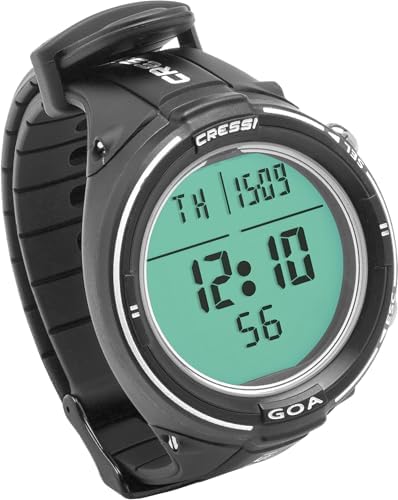

Physical Scuba Diving Computer Specs
The physical specs of a scuba diving computer dictate how the device sits on your wrist or arm and how it handles the harsh underwater environment. These measurements determine the comfort and durability of the hardware.
You can view our technical breakdown of how the Descent G1 performs to see if it fits your requirements.
- Case Diameter – This measures the width across the outer housing, with 3 of the 15 listings we screened stating a range from 46 to 55mm. A smaller diameter is often better for smaller wrists to prevent the device from catching on gear.
- Bezel – This is the outer ring of the device that protects the lens and allows for manual rotation of the display. A sturdy bezel prevents the screen from being scratched by rocks or equipment.
- Weight – This measures the mass of the device on your wrist. Lighter devices are generally preferred for long dives to reduce fatigue, though weight is often a trade-off for larger battery capacities.
- Display Type – This refers to the technology used to show data, such as LCD or OLED. High-contrast displays are better for visibility in murky water or low-light conditions.
- Water Rating – This is the maximum depth the device can withstand, usually expressed in meters or feet. You must ensure the rating exceeds your deepest planned dive by a significant margin.
Scuba Diving Computer Power and Fit
The power and fit options for a scuba diving computer ensure the device remains operational and comfortable throughout your underwater activity. These terms relate to how you maintain and wear the hardware.
- Charging Cable – This is the cord used to replenish the internal power source of the device. You must ensure the connector type matches the specific port on your computer.
- Replacement Strap – This allows for different sizes or materials, such as silicone or nylon, to fit your wrist. Having multiple options ensures the device remains secure during movement.
- Protective Case – This prevents scratches during transport and storage. A hard case is a necessary accessory for protecting the screen and buttons when the device is not on your wrist.
- User Interface – This describes how you navigate the menus, such as via buttons or a touchscreen. For many divers, physical buttons are preferred because they are easier to operate with wet gloves.
Common Scuba Diving Computer Confusions
Many buyers confuse specific terms that sound similar but serve different roles in your diving safety. Understanding these differences helps you avoid making a purchase based on the wrong data point.
How no-decompression limits and decompression stops differ in diving
No-Decompression Limit vs. Decompression Stop
A No-Decompression Limit is a time value that tells you how long you can stay at a depth. A Decompression Stop is a location or depth where you must pause during your ascent to let nitrogen leave your body. If you exceed your limit, you must perform a stop.
Check out our full Descent G1 Solar review to see how the solar charging capabilities impact daily use.
How surface intervals and bottom time affect nitrogen levels
Surface Interval vs. Bottom Time
Bottom time is the amount of time you spend underwater at your target depth. A surface interval is the time you spend out of the water between dives. The computer uses the surface interval to reset your nitrogen levels for the next dive.
Why dive computers use pressure readings to calculate depth
Depth vs. Pressure
Depth is the vertical distance from the surface, usually measured in meters or feet. Pressure is the force exerted by the water at that depth. While they are related, your computer uses pressure readings to calculate your depth.
How do I choose a scuba diving computer?
Choosing a scuba diving computer depends on your specific depth requirements and your preference for physical size. If you dive frequently to a specific depth, such as 30 meters, your primary requirement is a device that provides a stable pressure sensor reading and a battery life that exceeds your longest planned dive. You should prioritize a case diameter that fits your wrist comfortably, as a device that is too large may shift during movement. If you are a budget-focused diver, look for a model that provides the necessary depth rating and reliable NDL calculations without unnecessary aesthetic features. It is better to have a smaller, reliable computer that fits your needs than a larger one with features you will never use.
Browse our other scuba diving computer pages
- Which Freediving Computer Is Best for Entry Level Use?
- Best Watch Style Dive Computers
- Scuba Diving Computers for Multisport Training Compared
- Choosing the Best Watch-Style Dive Computer with Air Integration
- The Watch Style Dive Computers That Work Best for Small Wrists
- Which Scuba Diving Computer with GPS Is Best?