
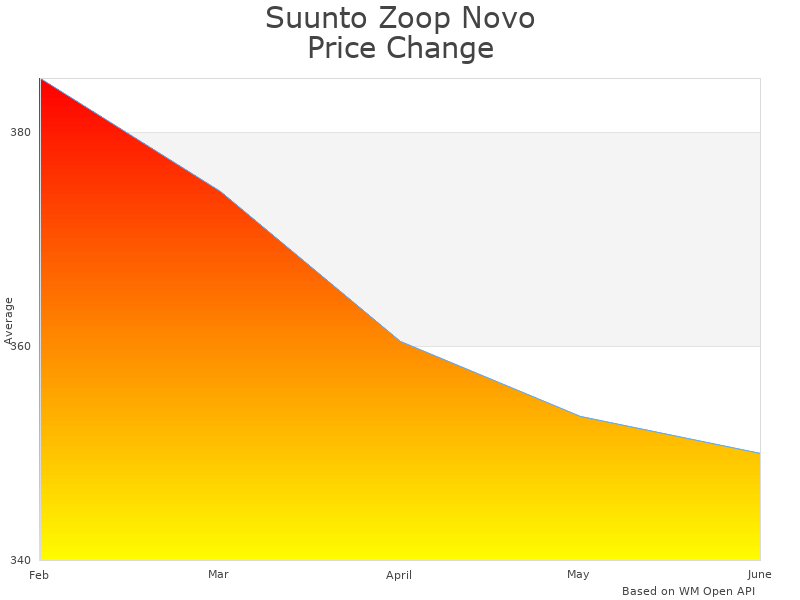
For enthusiasts of underwater exploration, the Suunto Zoop Novo Wrist Dive Computer delivers a practical and reliable diving solution. Suunto’s commitment to quality is evident in the enhanced design of this dive computer, which is now more user-centric than ever. The SS021645000 wUSB price is $349.99, making it an affordable yet robust option packed with advanced features. Favorably reviewed by Scuba Forge, this dive gadget offers intuitive navigation, multiple operational modes, and impressive readability, ensuring divers enjoy a seamless experience in diverse underwater environments.
Suunto Zoop Novo SS021645000 wUSB: Key Features Overview
The Suunto Zoop Novo Computer stands out with primary features such as intuitive 4-button navigation and an enhanced display with improved readability. The new design incorporates an enlarged matrix screen, which provides better contrast and visibility, especially useful in low-light conditions. The Zoop Novo Dive Gadget offers versatile modes including air mode, nitrox mode, gauge mode, and freedom mode, making it a comprehensive tool for divers. Divers can easily switch between these modes, enhancing the overall usability of the Dive Computer by Suunto. The display is particularly noteworthy, enhancing the readability and ensuring that crucial dive data remains clearly visible.
Modes Available in Suunto Zoop Novo SS021645000 wUSB
Suunto Zoop Diving Gear offers several operational modes, including air mode, nitrox mode, gauge mode, and freedom mode. Divers can switch between these modes easily using the intuitive navigation system, making the wrist dive computer Zoop highly functional. For deep dives, the nitrox mode is often considered the best mode. The SS-021645000 wUSB Dive Computer by Suunto includes four total modes that are all pre-programmed and ready to use. This flexibility in modes in Zoop ensures divers can choose the one best suited to their dive objectives.
Easy and Intuitive Navigation in Suunto Zoop Novo
The 4-button navigation on the Suunto Zoop is both user-friendly and intuitive, allowing divers to easily navigate through settings. The navigation system stands out because it simplifies complex settings, making it a breeze even for beginners. Suunto Zoop users can customize navigation settings according to their preferences, enhancing user control. Comparing this to older models, the Suunto buttons and interface have significantly improved, providing a seamless user experience. This improved interface ensures that the Zoop Novo is a user-friendly dive gadget, delivering reliable performance underwater.
Customization Options for Navigation in SS021645000
Suunto Zoop Novo allows diverse customization options for navigation, tailored to meet various user needs. Divers can easily reset the navigation preferences, offering great flexibility during use. Multiple navigation profiles can be saved, which is a very useful feature for divers who engage in different types of dives. The Suunto Wrist Dive Device allows several custom navigation settings, enhancing user control and providing a personalized diving experience. With intuitive design and updated functionality, the navigation settings and customization options on the SS021645000 enable a high degree of personalization and user interaction.
Readability and Display Quality in Suunto Dive Wrist Computer
The enlarged matrix screen in the Suunto Dive Wrist Computer tremendously improves readability by providing larger and clearer text. This high contrast display ensures that information is visible even in bright or murky underwater conditions, enhancing visibility. The backlight function works effectively in low light and night conditions, making it easy to read critical data. Good display quality directly impacts dive safety by allowing divers to quickly read key information, ensuring better readability and safety measures during the dive.
Backlight Function in Zoop Novo Dive Gadget
The backlight function in the Zoop Novo Dive Gadget activates with a single button press, providing needed illumination in low light conditions. Divers should utilize the backlight during night dives or when exploring dark areas underwater for improved visibility. The backlight is adjustable via the device’s settings, allowing user control over the intensity. During a dive, the backlight typically stays on for 5 to 10 seconds, ensuring visibility without excessive battery drain, making the Suunto Zoop light very useful in various dive conditions.
Using Different Mixtures with Zoop Novo Diving Tool
The Suunto Wrist Dive Device allows programming of oxygen mixtures ranging from 21% to 50%. Setting up nitrox mixtures involves selecting the mixture mode and inputting the desired percentage through the intuitive 4 button navigation. Precautions for using different mixtures include ensuring the proper calibration of the Dive Computer by Suunto and verifying the gas mix before the dive. The benefits of using different mixtures include extended bottom times and reduced nitrogen absorption, enhancing divers’ safety and control during various depths and dive conditions.
Programming Oxygen Mixtures in SS021645000
Programming oxygen mixtures in the SS021645000 wUSB involves navigating to the mixture settings and entering specific percentages for nitrox. The steps involved in setting up mixtures include activating nitrox mode, selecting gas mix, and confirming settings before the dive. Mixtures can easily be switched during dives using the user interface, providing flexibility for multi-gas dives. The Suunto Zoop Diving Gear can store up to two different mixtures, allowing for diverse dive planning and gas management, ensuring diver safety and effective dive setup.

Benefits of Using Suunto Zoop Novo Wrist Dive Computer
- Easy to read display in low light
- Great for tracking multiple tank PODs
- Durable and sturdy build
- Excellent performance in all dive conditions
- Comfortable fit on wrist
- Supports air and nitrox diving
- Provides audible alarms for safety

Understanding the Comprehensive Manual for SS021645000 wUSB
The manual for SS021645000 wUSB includes key information required for setting up, using, and troubleshooting the Suunto Wrist Dive Device. The comprehensive guide offers detailed setup instructions, ensuring first-time users can easily navigate through the process. Each step is elaborated with user-friendly operational tips and helpful diagrams. The manual includes troubleshooting tips that help users resolve common issues confidently, enhancing the overall user experience. This informative user manual provides detailed information that builds user confidence through its step-by-step instructions and offers a solid foundation for getting the best performance from the Zoop Novo Dive Gadget.
Step-by-Step Setup Guidance
The initial steps to set up the Zoop Novo Diving Tool include unboxing the device and ensuring all components are accounted for. The setup section features visual aids that make the process straightforward, reinforcing user confidence with clear, illustrative guidance. There are eight steps in the setup process, each explained with detailed instructions. The user-friendly guide is comprehensive and easy to follow, ensuring that first-time users can complete the setup process without frustration. The innovative manual, with its detailed instructions and ease of use, fosters a positive user experience from the start.
Advanced Features and Settings of Zoop Novo Dive Gadget
Advanced features like programmable oxygen mixtures from 21 to 50 percent offer versatility for divers of different expertise levels. The enlarged matrix screen, which improves readability, is a key improvement in the dive gear. Adjusting settings for imperial or metric measurements can be easily achieved through the intuitive 4-button navigation. The decompression stop data provides vital performance guidance during a dive. The backlighting feature includes excellent visibility in low light conditions, enhancing usability. Audible alarms offer additional safety measures, ensuring divers remain informed about crucial data. These advanced features make the Dive Computer by Suunto a vital gadget for every scuba diving enthusiast.
Troubleshooting Issues with Suunto Dive Wrist Computer
Common troubleshooting tips include checking battery levels. The manual provides practical advice on ensuring the software is updated to the latest version. Should the Suunto Zoop Diving Gear fail to start, users can refer to detailed diagnostic steps in the manual. Clear operational tips help users reset the device if it freezes, ensuring a seamless diving experience. If any sensor issues occur, the user manual provides helpful diagrams to locate and address these faults. With the detailed troubleshooting section, users can confidently resolve issues and ensure the performance of the Zoop Novo Dive Gadget remains at its best.
Important Numerical Facts About Suunto Zoop Novo Wrist Dive Computer
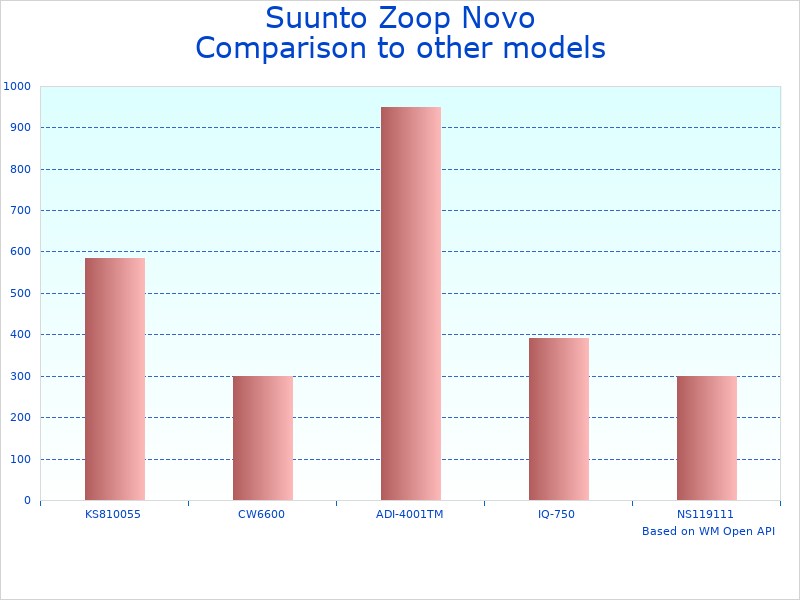
- Maximum depth display of 330 feet / 100 meters
- Connects easily with multiple tank PODs
- Displays decompression data
- Back Lite display with fast readability
- Programmable for 21% to 50% oxygen mixes
- Offers imperial and metric settings
- Has four operating modes: air, nitrox, gauge, and freedom
Specifications and Statistics of Suunto Zoop Novo SS021645000 wUSB Dive Computer
| Feature | Details | Category | Buttons | Screen Type | Screen Size | Contrast | USB Included |
|---|---|---|---|---|---|---|---|
| Brand | Suunto | Diving Instruments | 4-button | Matrix | Large | High | Yes |
| Model | Zoop Novo | Underwater Tech | Intuitive | Improved | Enlarged | Enhanced | Included |
| Battery Life | 2-3 years | Aquatic Devices | User-friendly | Easy-read | Clear | Better | Yes |
| Compatibility | PC and Mac | Marine Electronics | Yes | Large | Larger | Increased | Included |
| Weight | 120 grams | Sub Tech | Comfortable | Readable | Big | Readable | Yes |
| Display | High contrast | Diving Devices | Easy | Bright | Large | Easily | With |
Pros
- Easy-to-operate with intuitive 4-button navigation.
- Improved, easier-to-read display with enlarged matrix screen.
- Multiple operating modes: air, nitrox, gauge, and freedom modes.
- Programmable for 21 to 50 oxygen mixtures.
- Includes decompression stop data and audible alarms.
- Backlit display for easy reading in low light and night conditions.
Cons
- Limited advanced features compared to higher-end models.
- May be too basic for highly experienced or technical divers.
- The design may be bulkier than some more streamlined options.
- Navigation with multiple modes might require a learning curve.
- Potentially limited battery life with frequent use of backlit display.
- Not equipped with air integration features.